Operating Systems
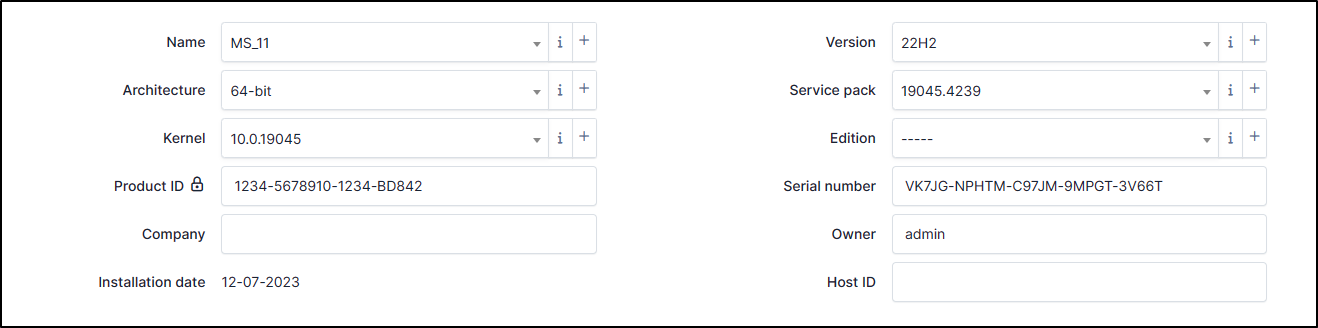
Name
This information is updated by the automatic inventory. You can add/modify it manually if necessary.
To create a name, click +
Enter the Name
Enter a comment (optional)
Click + Add to save your OS
You can, now, select your OS in the drop-down list
OS |
CLI |
|---|---|
Windows |
|
Linux |
|
MAC |
|
Architecture
Identifies the architecture of the referenced machine (32 or 64 bits, ARM, etc.). This information can be provided automatically via the automatic inventory or can be added manually.
To create an architecture, click +
Enter the Name
Enter a comment (optional)
Click + Add to save your architecture
You can, now, select your OS in the drop-down list
OS |
CLI |
|---|---|
Windows |
|
Linux |
|
MAC |
|
Kernel
It is the version of the kernel. This information can be updated by the automatic inventory or can be added manually.
To create a Kernel, click +
Enter the Name (the version)
Enter a comment (optional)
In Kernel field, select the one that suits you best.
If none match, click on the i
Click + Add
Enter the name you want
Click + Add
Go back to computer > operating systems and repeat the previous step to create your kernel
Click + Add to save your architecture
You can, now, select it in the drop-down list
OS |
CLI |
|---|---|
Windows |
|
Linux |
|
MAC |
|
Product ID
References the OS serial number. This information can be accessed via :
OS |
CLI |
|---|---|
Windows |
|
Linux |
|
MAC |
No information |
Company
If a company has been registered, this field refers to it. This information can be provided automatically via the automatic inventory or can be added manually.
OS |
CLI |
|---|---|
Windows |
|
Linux |
No information |
MAC |
No information |
Version
This field references the OS version (22.04.4 LTS Jammy Jellyfish, 22H2, etc.). This field can be updated by the automatic inventory. You can create a version if you want to customize this field :
To create a version, click on +
Enter a Name
Enter a Comment (optional)
Click + Add
Select now the version you want by the drop-down list
Service pack
Service pack is the OS package installed on the machine (generally for Windows). This information can be provided automatically via the automatic inventory or can be added manually.
To create a service pack, click +
Enter a Name
Enter a Comment (optional)
Click + Add
Select now the service pack you want by the drop-down list
Edition
This field was previously used to indicate the edition of the OS, but is now indicated in the name field.
This information can be provided automatically via the automatic inventory or can be added manually.
To create an Edition, click +
Enter a Name
Enter a Comment (optional)
Click + Add
Select now the edition you want by the drop-down list
Serial number
Generally for Windows, this field references the Client Product Key installed on the machine. This is not the license of the OS but generic key the Operating system edition (Windows Pro 11, Windows Server 2022 Datacenter, etc.) This information is updated by the automatic inventory but you can add/modify this value manually.
Owner
The field is the owner of the license. This information can be updated by the automatic inventory or can be added manually.
OS |
CLI |
|---|---|
Windows |
|
Linux |
No information |
MAC |
No information |
Host ID
Typically for Linux, HostID allows administrators to associate it with software licenses or perform system-specific operations.
This information is updated by the automatic inventory but you can add it manually.
You can find this information with hostid command on Linux System.